The best MIDI interfaces under $300 make it easier to connect keyboards, synthesizers, drum machines, and other hardware to a computer or larger studio setup. The right choice depends less on price alone and more on port count, connection type, latency, and whether you need audio inputs too.
This roundup covers simple USB-to-MIDI cables, compact 2×2 interfaces, multi-port MIDI hubs, and audio interfaces with built-in MIDI connectivity. Use the guide below to narrow the options based on your equipment and workflow.
Best 10 Midi Interfaces Under 300 Picks for 2026
Flexible 4x4 Recording Hub

- 4x4 USB audio with MIDI I/O
- Four phantom-powered MIDAS preamps
- 24-bit/192 kHz support and metal chassis
Best For: Home studios recording multiple sources with MIDI gear
Standalone MIDI Routing Center
ESI M4U eX 8-Port MIDI Interface

- Eight adaptable MIDI ports
- Standalone routing and merging
- Three-port USB 3.0 hub
Best For: Large MIDI setups and live-performance routing
Compact Audio-MIDI Starter

- Compact interface with five-pin MIDI I/O
- Combo input and loopback feature
- Software bundle and five-year warranty
Best For: Beginners recording vocals, guitar, synths, and MIDI gear
Simple Two-Port MIDI Adapter
Midiplus 2x2 USB MIDI Interface

- Two MIDI inputs and two outputs
- USB-powered with no external adapter
- Driver-free Mac and Windows operation
Best For: Small, straightforward computer MIDI setups
Best for Expanding Setups

- 18x20 USB audio/MIDI I/O
- Eight MIDAS preamps with phantom power
- ADAT support and 24-bit/96 kHz audio
Best For: Larger recording setups with multiple microphones and instruments
Best Compact MIDI Router

- Standalone USB host for DIN MIDI hardware
- Expand to up to eight USB MIDI devices
- Routing, filtering, and mapping presets
Best For: Hybrid MIDI rigs using USB and five-pin DIN gear
Best Simple 2x2 Interface

- 2x2 audio I/O with MIDI
- Two Onyx preamps and Hi-Z inputs
- Bus-powered with zero-latency monitoring
Best For: Solo recording and compact home studios
Best Advanced MIDI Cable

- Advanced filtering, mapping, and routing
- Broad OS and MIDI message support
- Low-latency 6.5-foot USB-A cable
Best For: Musicians managing complex MIDI setups
Best USB-C MIDI Interface
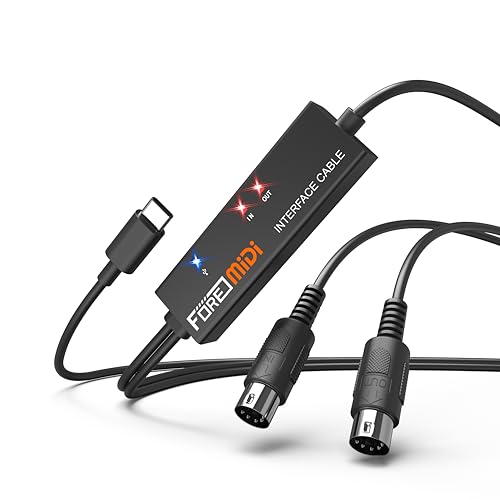
- USB-C-focused plug-and-play design
- LEDs show power and MIDI activity
- Works with major desktop and mobile systems
Best For: Portable keyboard and mobile recording setups
Best Budget MIDI Cable

- Simple 1-in/1-out MIDI connection
- Supports 16 MIDI channels
- Includes a USB-to-Type-C adapter
Best For: Basic keyboard-to-computer MIDI recording
Flexible 4×4 Recording Hub – Behringer U-PHORIA UMC404HD
For musicians looking at MIDI interfaces under 300, the Behringer U-PHORIA UMC404HD combines four-in/four-out USB audio with dedicated MIDI I/O. Its four MIDAS-designed preamps, 24-bit/192 kHz support, and metal chassis make it a practical choice for a computer-based recording setup.
Best For: Home studios recording multiple microphones or instruments while connecting MIDI gear.
Pros:
- 4×4 USB audio routing plus one MIDI input and output
- Four preamps with +48V phantom power
- Supports up to 24-bit/192 kHz audio
- Impact-resistant metal chassis
Cons:
- Larger and heavier than compact single-input interfaces
- Its four-channel capacity may be more than simple MIDI-only setups need
The UMC404HD stands out when you need both substantial audio connectivity and straightforward MIDI integration in one durable interface.
Standalone MIDI Routing Center – ESI M4U eX 8-Port MIDI Interface
Among MIDI interfaces under 300, the ESI M4U eX is aimed at setups with many keyboards, controllers, and other MIDI devices. It provides eight adaptable MIDI ports, standalone routing and merging, plus a built-in USB 3.0 hub.
Best For: Larger computer-based or live MIDI rigs that need flexible routing and multiple connections.
Pros:
- Eight configurable MIDI ports
- Standalone operation with routing and merging
- Built-in USB 3.0 hub with three connectors
- Class-compliant Windows and macOS connectivity
Cons:
- Designed for extensive MIDI systems rather than audio recording
- Optional Windows driver is needed for complex multi-device, multi-client operation
With adaptable ports, visual status LEDs, and computer-free operation, the M4U eX is a strong fit for users building a central MIDI control station.
Compact Audio-MIDI Starter – Arturia MiniFuse 1
For shoppers comparing MIDI interfaces under 300, the Arturia MiniFuse 1 offers a compact way to record voice, guitar, synths, and other sources while connecting MIDI equipment. It includes a combo input, balanced outputs, headphone monitoring, loopback, and a substantial software bundle.
Best For: Beginners, vocalists, guitarists, and mobile home-studio users who want audio and MIDI in a small interface.
Pros:
- Compact USB interface with five-pin MIDI input and output
- Combo mic/instrument/line input with 48V phantom power
- Loopback feature for capturing voice alongside computer audio
- Includes creative software and a five-year warranty
Cons:
- Only one primary combo input
- Less suitable for recording several microphones simultaneously
The MiniFuse 1 prioritizes simplicity and portability, making it an accessible option when you need basic recording, MIDI connectivity, and useful bundled software.
Simple Two-Port MIDI Adapter – Midiplus 2×2 USB MIDI Interface
If you are searching for MIDI interfaces under 300 and only need essential hardware connectivity, the Midiplus 2×2 keeps things straightforward. It provides two MIDI inputs and two MIDI outputs, draws power from USB, and requires no driver on Mac OS X or Windows XP and above.
Best For: Basic computer-based MIDI connections involving a small number of keyboards, controllers, or modules.
Pros:
- Two MIDI inputs and two MIDI outputs
- USB-powered with no external supply required
- No driver needed for supported Mac and Windows systems
- Compact, lightweight design
Cons:
- Provides MIDI connectivity rather than audio inputs or outputs
- Fewer ports and routing features than larger MIDI interfaces
The Midiplus 2×2 is a practical budget-oriented choice for uncomplicated MIDI setups where plug-and-play USB operation matters more than advanced routing.
Best for Expanding Setups – Behringer UMC1820
For shoppers comparing MIDI interfaces under 300, the Behringer UMC1820 stands out as a high-capacity USB audio/MIDI interface for recording multiple microphones and instruments. Its 18×20 I/O, eight MIDAS preamps, ADAT connectivity, and support for up to 96 kHz recording suit larger home studios and project setups.
Best For: Recording several microphones and instruments while leaving room for expanded inputs and outputs.
Pros:
- Offers 18 inputs and 20 outputs over USB 2.0.
- Includes eight MIDAS-designed mic preamps with +48V phantom power.
- Supports ADAT I/O and 24-bit/96 kHz audio.
- Works with popular software including Pro Tools, Ableton Live, and Cubase.
Cons:
- Its larger 24.35-inch width may be excessive for compact desks.
- Provides more I/O than a simple two-channel recording setup may require.
The UMC1820 is a practical choice when channel count and expansion matter more than portability. It is especially compelling for users building a flexible studio around multiple microphones, instruments, or external hardware.
Best Compact MIDI Router – CME H2MIDI Pro
If your search for MIDI interfaces under 300 centers on routing rather than microphone recording, the CME H2MIDI Pro is a compact USB host and MIDI interface. It connects modern USB MIDI devices with traditional five-pin DIN hardware, works without a computer in host mode, and supports advanced routing through HxMIDI Tools.
Best For: Hybrid hardware setups involving USB keyboards, controllers, synthesizers, drum machines, and legacy DIN MIDI equipment.
Pros:
- Connects USB MIDI devices directly to five-pin DIN MIDI hardware without a computer.
- Supports up to eight USB MIDI devices through a standard hub.
- Offers routing, filtering, mapping, and splitting with up to four saved presets.
- Works across macOS, Windows, iOS, Android, Linux, and ChromeOS.
Cons:
- It is a MIDI-focused device, not a microphone or analog audio recording interface.
- Advanced configurations require HxMIDI Tools software.
The H2MIDI Pro makes sense for producers and performers who need flexible MIDI communication in a very small enclosure. Its standalone host mode and broad operating-system compatibility are useful for computer-free and hybrid rigs.
Best Simple 2×2 Interface – Mackie Onyx Producer 2X2
Mackie Audio Interface, Onyx Producer 2X2 USB Audio Interface with MIDI (Onyx Producer 2-2)
Check Price On AmazonFor buyers evaluating MIDI interfaces under 300 for straightforward recording, the Mackie Onyx Producer 2X2 combines MIDI I/O with two analog inputs and outputs. Its Onyx preamps, Hi-Z support, zero-latency monitoring, and bus-powered USB design make it well suited to compact mobile or desktop sessions.
Best For: Solo musicians and small home studios recording microphones, line-level sources, or direct instruments.
Pros:
- Provides 2×2 audio I/O plus MIDI I/O.
- Two Onyx mic preamps include +48V phantom power.
- Combo inputs accept mic, line, and Hi-Z instrument sources.
- Offers zero-latency direct monitoring and bus-powered USB operation.
Cons:
- Two inputs and two outputs limit larger multi-microphone sessions.
- It may be less suitable when extensive expansion or ADAT connectivity is needed.
The Onyx Producer 2X2 is a balanced pick for musicians who want essential audio recording features and MIDI in a portable format. Its simple 2×2 layout keeps setup manageable while still covering common mic, instrument, and monitoring needs.
Best Advanced MIDI Cable – CME U2MIDI Pro
For shoppers comparing midi interfaces under 300, the CME U2MIDI Pro stands out as a feature-rich USB-to-MIDI cable for computers, mobile devices, and traditional MIDI hardware. It offers plug-and-play compatibility across major operating systems, plus filtering, mapping, and routing through the included UxMIDI Tools software.
Best For: Musicians who need advanced MIDI routing and filtering in a compact, low-latency cable.
Pros:
- Supports MIDI notes, controllers, clock, SysEx, MTC, and MPE across 16 channels.
- Works with macOS, iOS, Windows, Android, Linux, and ChromeOS without additional drivers.
- Includes UxMIDI Tools for filtering, mapping, and merge/split routing.
- Uses a high-speed processor and optocoupler designed for accurate, low-jitter transmission.
Cons:
- Its USB-A connection may require an adapter for some newer devices.
- It provides one MIDI input and one MIDI output rather than multiple DIN ports.
The U2MIDI Pro is a strong choice when basic MIDI connectivity is not enough. Its software features and broad device compatibility make it especially useful for complex setups, while the integrated 6.5-foot cable keeps the rig relatively tidy.
Best USB-C MIDI Interface – FORE T1 MIDI USB Interface
The FORE T1 is a straightforward option for shoppers comparing midi interfaces under 300, especially those connecting a MIDI keyboard or instrument to a USB-C device. Its built-in driver, status LEDs, and bus-powered design aim to make recording and editing quick to set up.
Best For: Mobile and desktop musicians who want a plug-and-play USB-C MIDI connection.
Pros:
- Provides one MIDI input, one MIDI output, and 16 MIDI input/output channels.
- Compatible with iOS, Android, Windows, and macOS systems.
- LED indicators show power and signal-transfer status.
- Supports common music software including GarageBand, FL Studio, Cubase, and Sonar.
Cons:
- The USB A-C adapter is not included.
- Its compatibility is centered on devices with a 5-pin DIN MIDI port and USB connection.
With a 6.5-foot cable and USB bus power, the FORE T1 is convenient for a portable keyboard or home recording setup. Choose it if USB-C connectivity and simple operation matter more than advanced MIDI processing features.
Best Budget MIDI Cable – NUOSIYA USB to MIDI Cable
The NUOSIYA USB to MIDI cable is a simple choice for shoppers comparing midi interfaces under 300 who need to connect a compatible keyboard or piano to a computer. Its 1-in/1-out design supports 16 MIDI channels and is intended for recording and editing MIDI data.
Best For: Home users seeking a basic USB connection between a 5-pin MIDI instrument and a computer.
Pros:
- Connects compatible MIDI keyboards and pianos to computers for recording and editing.
- Offers one MIDI input, one MIDI output, and 16 MIDI channels.
- Compatible with Windows and Mac OS systems listed by the manufacturer.
- Includes a USB-to-Type-C adapter for connecting to some mobile devices or iPads.
Cons:
- Some mobile connections may require an adapter, depending on the device.
- It is designed for MIDI data transfer rather than audio transmission.
- Older or nonstandard audio equipment may need additional adapters.
The NUOSIYA focuses on essential MIDI connectivity rather than advanced routing or mapping. It is a practical fit for straightforward computer-based recording, provided your instrument uses standard 5-pin MIDI and your device has a compatible USB connection.
How We Picked the Best Midi Interfaces Under 300
We focused on connectivity, compatibility, flexibility, and value. The selection includes dedicated MIDI interfaces, USB MIDI cables, compact USB host devices, and audio interfaces that add MIDI ports alongside microphone and instrument inputs. We also considered whether each product is class-compliant or designed for straightforward plug-and-play use, since reliable setup matters when working across Windows, macOS, tablets, and hardware instruments.
Port configuration was another priority. A basic cable may be enough for one keyboard, while a multi-port interface is better for several synthesizers, controllers, or a hardware MIDI network. Audio interfaces were included for musicians who want recording inputs and MIDI in one device.
Quick Comparison
| Type | Best For | What to Expect |
|---|---|---|
| USB-to-MIDI cable | One keyboard or instrument | Lowest cost and simplest setup |
| 2×2 MIDI interface | Small home studios | Dedicated MIDI In and Out with room for basic routing |
| Multi-port MIDI interface | Hardware-heavy setups | More simultaneous connections and routing flexibility |
| Audio/MIDI interface | Recording and production | Microphone, instrument, headphone, and MIDI connectivity in one unit |
| USB host interface | Connecting USB MIDI gear to hardware | Useful when a computer is not part of the signal path |
Key Buying Factors for MIDI Interfaces Under $300
Port Count and Routing
Count the MIDI devices you plan to connect now, then leave some room for expansion. A 1-in/1-out cable handles a single instrument, while 2×2 models support more flexible two-way communication. Multi-port units are preferable for several synths, controllers, or external sequencers.
USB Type and Compatibility
Check whether the interface uses USB-A, USB-C, or an adapter. Class-compliant devices generally work without dedicated drivers, but confirm compatibility with your operating system and mobile device before buying. USB MIDI and traditional five-pin MIDI are not interchangeable in every setup.
Audio Features
If you also record microphones, guitars, or line-level hardware, an audio/MIDI interface can replace two separate devices. Check input count, phantom power, headphone monitoring, sample-rate support, and ADAT expansion if you expect your studio to grow.
Latency, Filtering, and Build
Low latency depends on the interface, computer, software, and drivers, but dependable timing is essential for playing software instruments. For portable or stage use, prioritize sturdy connectors, clear status indicators, and MIDI filtering or mapping features when available.
Who Should Buy Which Midi Interfaces Under 300?
Choose a USB-to-MIDI cable if you only need to connect one older keyboard or instrument to a computer. Choose a compact 2×2 interface for a small studio with one or two MIDI devices and basic routing needs.
Choose a multi-port MIDI interface if you use several synthesizers, drum machines, or controllers and want centralized connections. Choose a USB host interface when you need to connect USB MIDI equipment directly to compatible hardware without relying on a computer.
Choose an audio/MIDI interface if recording vocals or instruments is equally important. These models can be the most practical choice for a home studio, provided their audio inputs and expansion options match your production plans.